How to Play as Titan in Shadow Fight 2: Titan Mod Explained (Honest Guide)
Every Shadow Fight 2 player has had the same thought after the final boss fight: what would it feel like to be on the other side of that sword? Titan is the biggest, hardest hitting character in the game, and the idea of playing as him is one of the most searched topics in the whole community. The short answer is this: in the official game made by Nekki, you cannot play as Titan. He is the final boss, and he stays the final boss. Playing as Titan is only possible through fan made mods, and those mods come with real trade offs that most download pages never mention.
This guide explains both sides honestly: what Titan is in the official game and why he is not playable there, how the fan made Titan mods work, how Titan fights differently from Shadow, and the risks you should know before you install anything.
Who Titan Is in the Official Game
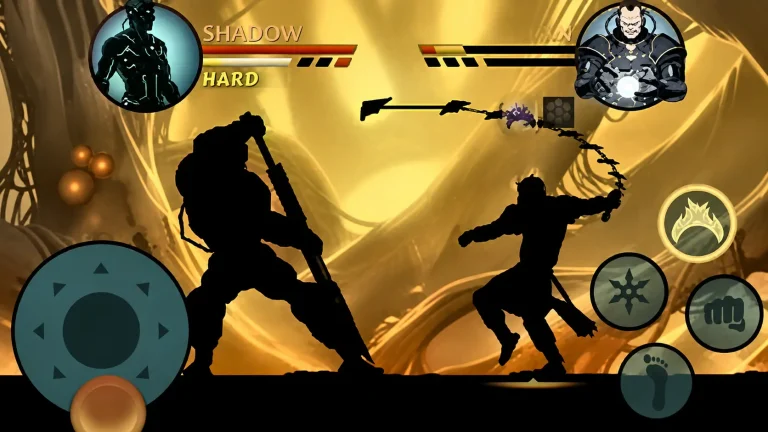
Titan is the conqueror of worlds and the final boss of Shadow Fight 2. He waits at the end of Act 7, after you have beaten Lynx, Hermit, Butcher, Wasp, Widow, and Shogun, closed the Gates of Shadows, and worked through the Interlude chapters. He is not a normal boss. He fights in his own domain, he carries the massive blade called the Desolator, he opens the fight behind an energy shield, and he hits harder than any demon boss before him.
Beating him ends the story. His body is destroyed, Shadow survives and regains his physical form, and the game does not hand you Titan as a playable character afterward. There is no unlock, no shop purchase, and no level that turns Shadow into Titan in the official version. If a page tells you that reaching level 52 in the official game unlocks Titan as a playable fighter, that is not true. Level 52 is the real max level in Shadow Fight 2, and it unlocks better gear, not a new character.
The same honesty applies to his weapon. The Desolator is the one boss weapon you cannot obtain in the official game, even by beating Titan in Eclipse mode. Eclipse wins give you other boss weapons, but Titan’s blade stays with Titan. That is exactly why the fan mods exist: they give players the two things the official game never gives them, Titan’s body and Titan’s sword.
What the Titan Mod Actually Is
A Titan mod is a modified version of the game, made by fans, that swaps your playable character for Titan. Instead of fighting as Shadow, the small fast silhouette you have controlled since Act 1, you fight as the giant armored conqueror himself. Most Titan mod builds are based on older versions of the game, and many also bundle the usual mod menu extras, such as unlocked gear, extra coins and gems, and unlimited energy. Our separate mod menu guide explains those extras in detail.
It is important to understand what this is not. A Titan mod is not an official update, not a Nekki feature, and not something you can buy in the Play Store. It is a fan made file, installed outside the official store, and it only works on the version it was built for. That is why so many Titan mod pages still list old versions like 2.41.9. The latest official version of Shadow Fight 2 is v2.46.0, but a Titan mod built for an older version will not magically become the latest version just because the download page says so.
How Titan Mods Work: The Old File Swap Method
The classic method, described in guides going back to 2022, works like this. You install an older version of the game, then you add modified game files that replace Shadow’s character data with Titan’s. The guides from that era describe using a file manager app to copy the mod files into the game’s folder, then launching the game offline so the swapped character loads correctly. Once it works, you can pick Titan’s body and weapon from the inventory screen.
Newer Titan mod builds package all of this into a single modified APK, so there is no manual file copying. You install the mod APK instead of the official game, and Titan is available from the start. Either way, the principle is the same: the mod changes the game files on your device. It does not change your account on Nekki’s servers, and it does not unlock anything in the official game. If you uninstall the mod and go back to the official version, Titan is gone again, and your mod progress may not carry over. Back up your save before you try any mod, because a bad install can cost you a save file you spent months building. Our backup and transfer guide covers every method step by step.
How Titan Fights Differently From Shadow
Playing as Titan is not just Shadow with a new skin. Everything about the fight changes, and players who rush in like they are still playing Shadow get punished fast.
Size, Reach, and Speed
Titan is huge, and that changes the whole fight. His hitbox is much bigger, so enemy attacks that would have missed Shadow can connect on Titan. His movement is slower, and he cannot roll, duck, jump, or flip the way Shadow can. What he loses in mobility he gains in reach. The Desolator can hit enemies from far away, sometimes across half the arena. The winning style with Titan is spacing: keep your distance, poke with the blade’s long reach, and do not let fast enemies get inside your guard.
Titan’s Attacks: Desolator, Grab, and Magic
Titan’s kit is built around three tools. The Desolator does heavy damage on every clean hit, and its long swing punishes enemies who try to close the distance. The Titan grab is his signature move: if he catches you, he lifts you up and slams you with the sword. His magic is long range and punishing, with blasts that are difficult or impossible to block for most standard opponents. The pattern is simple: control range with the blade, grab enemies who get too close, and use magic to punish anyone who tries to run or play defensively.
The Biggest Mistake New Titan Players Make
The biggest mistake is playing Titan like a tank who can ignore damage. Yes, he hits hard, but his size makes him an easy target, and he cannot dodge the way Shadow can. Players who walk forward swinging wildly eat ranged attacks and magic from every enemy on screen. Patience wins with Titan. Wait for the enemy to commit, punish with one or two heavy hits at maximum range, then reset your spacing. Even with mod extras like unlimited energy switched on, timing and spacing are what make Titan fights look good instead of messy.
Titan Mod vs Official Game: An Honest Comparison
In the official game, you play Shadow, progress through seven acts, earn gear level by level up to level 52, and fight Titan once as the final test. In a Titan mod, you start as Titan, skip the normal progression, and replay old fights from the boss’s side of the arena. The mod is a fun sandbox, not a replacement for the real game. It does not give you new story content, and it does not make you better at the official game, because Titan’s slow, long range style teaches almost nothing about playing Shadow.
Risks and Warnings Before You Install a Titan Mod
Most Titan mod download pages skip this section entirely, and that is the biggest gap in the competition. Here is what they leave out.
First, a mod APK comes from a random website, not from Google Play, so nobody is checking it for you. Never trust a page that guarantees a file is safe, and never install a mod on a phone that holds banking apps or sensitive work data without thinking it through. Second, mod builds are usually based on older game versions, so you may lose newer official content, fixes, and features by switching. Third, mods can break your save, crash on newer Android versions, or refuse to load after an official update. Fourth, there is no official support.
A sensible approach is to treat a Titan mod as a toy install, not your main game. Back up your official save first, use a spare device or a separate profile if you have one, stay offline while using the mod, and never enter personal account details into a modded game. If any of that sounds like too much hassle, the honest alternative is to enjoy Titan the way the game intends: as the final boss fight, replayed in Eclipse mode at higher difficulty.
Frequently Asked Questions
Can you play as Titan in Shadow Fight 2 officially?
No. In the official game by Nekki, Titan is the final boss only. There is no official unlock, purchase, or level that makes him playable. Playing as Titan requires a fan made mod.
How do you unlock Titan in Shadow Fight 2?
You do not unlock Titan as a character. You unlock the Titan boss fight by finishing the story: beat the six demon bosses, close the Gates of Shadows, complete the Interlude chapters, and reach the end of Act 7 at a high level, with level 52 gear recommended.
Can I get Titan’s weapon, the Desolator, in the official game?
No. The Desolator is the only boss weapon that is not obtainable by players in the official game, even in Eclipse mode. It is only usable through fan mods that swap your character to Titan.
What level should I be to fight Titan?
Level 52 gear is the recommended standard for the Titan fight, since 52 is the real max level in Shadow Fight 2. Skill and spacing matter as much as gear, because Titan punishes careless attacks with his shield phases and heavy swings.
Can I fight Titan again after beating him?
Not directly. To fight Titan again in the official game, you need to start a new playthrough from the beginning. Eclipse mode lets you replay bosses at higher difficulty, but the full story path must be completed again for another Titan fight.
Is the Titan mod safe to install?
No page can honestly guarantee that. Titan mods are unofficial files from third party sites, built for older game versions, and they carry real risks: malware from untrusted sources, broken saves, crashes, and no official support. Back up your save, stay offline, and never treat a mod install as risk free.
Does the Titan mod work on the latest version, v2.46.0?
Most Titan mod builds are based on older versions, not v2.46.0. A page that labels an old mod build as the latest version is misleading. Check the actual build version before installing, and expect to lose newer official content if you switch to an old mod build.
Why do so many Titan mod pages look outdated?
Because most of them are. The popular Titan mod guides date back to 2022, and many download pages have copied the same text and old version numbers for years. Trust guides that state the mod’s real build version and its risks, not pages that promise everything with no downsides.
Final Verdict: Is the Titan Mod Worth Trying?
If you love Shadow Fight 2 and you want to see the game from the boss’s side of the arena, a Titan mod is a fun experiment, and the long reach of the Desolator really does change how fights feel. But go in with your eyes open: it is an unofficial, usually outdated fan file, not an official feature, and it comes with save, security, and compatibility risks that the download pages will not warn you about. Back up your save, keep it offline, and keep your official game as your main progress.
For the full Shadow Fight 2 experience, start with the official game on our homepage, then use our boss guides and Eclipse mode guide to master the fights the way Nekki designed them. Titan is at his best as the final test of everything you learned as Shadow, and that is a fight worth earning.
Related Guides
Read our guide on how to beat Shogun, the Act 6 boss who stands between you and the road to Titan, and our Eclipse mode guide for replaying the whole story at higher difficulty. If you use any mod, read our mod menu features guide and our save backup guide first, so one bad install never costs you your progress.