Shadow Fight 2 Mod Menu Features Explained: God Mode, One Hit Kill, Dumb AI and More
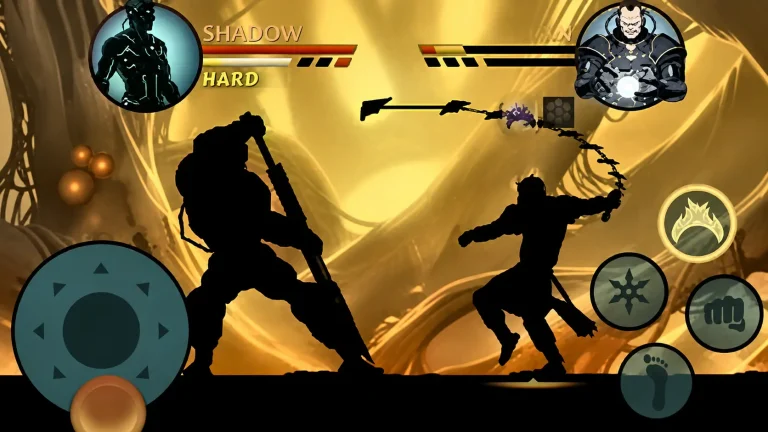
You install a Shadow Fight 2 mod, open the game, and a small floating icon sits on the edge of the screen. You tap it, a panel opens, and you are staring at a list of toggles: God Mode, One Hit Kill, Dumb AI, Speed Game, Auto Play. No explanation, no warning, just switches.
Most mod pages do the same thing. They list the features in a table and stop there. They never tell you what each toggle actually does in a fight, when to turn it on, or which combinations will ruin your save or make the game unplayable. That is the gap this guide fills.
What Is a Mod Menu in Shadow Fight 2?
A mod menu is a small floating panel built into some mod builds of the game. It usually appears as a small icon on the screen once the game loads. Tap it and the panel opens over the game. You can switch toggles on and off without restarting, and in most builds you can do it mid battle.
That on and off control is the whole point. A basic unlimited money build just gives you coins and gems and leaves it at that. A mod menu build lets you decide how easy you want each fight to be, fight by fight.
Not every mod build has a menu. Some builds only offer unlimited coins, gems and energy, with all gear unlocked and no panel at all. If you open the game and see no floating icon, your build probably does not include a menu. That is not a bug. It is just a different type of build.
Mod Menu 1 vs Mod Menu 2: The Two Builds Everyone Confuses
Menu 1 and Menu 2 are not two menus inside one build. They are two different build styles, and mixing them up is why a lot of players end up confused.
Mod Menu 1: Gameplay Toggles
Menu 1 is the one with the combat switches. It focuses on changing how fights play: speed, damage, enemy behaviour and automation. This is the build players mean when they say “mod menu.” Typical toggles include God Mode, One Hit Kill, Power Hit, Unblockable Attack, Dumb AI, Long Range Hit, Speed Game, Drunken Master, Frozen Enemies and Auto Play, plus unlimited coins and gems.
Mod Menu 2: Unlimited Everything
Menu 2 is less about combat switches and more about resources. It gives unlimited gems, coins and energy, all enchantments unlocked, unlimited tickets and orbs, and everything unlocked from the start.
One honest correction matters here. Several mod pages claim Menu 2 starts you at level 99. The real max level in Shadow Fight 2 is 52. Any page promising level 99 is wrong, or describing a hacked level display that does not match the real game. Treat level 99 claims as a red flag for that page, not as a feature.
If you only want currency and unlocked gear, a Menu 2 style build is enough, and you can play fights normally. If you want to change how fights behave, you need a Menu 1 style build.
Every Mod Menu Toggle, Explained Honestly
God Mode: You Cannot Take Damage
God Mode makes your health bar stay full no matter what hits you. Punches, kicks, weapon strikes and magic all deal zero damage to you. You can still attack, block and move normally. You just do not die.
Best use: as a training tool. Turn it on for your first two or three fights against a new boss, learn the moveset and timing, then turn it off and fight properly. Left on forever, it stops you learning, because there is no reason to block, dodge or time anything.
One Hit Kill: Every Hit You Land Ends the Fight
One Hit Kill means every attack you land defeats the enemy in a single hit, whether it is a punch, a kick, a weapon strike or magic. It works on normal enemies and on bosses too, which is why it is the most tempting toggle in the whole menu.
The catch most pages hide: in some builds, One Hit Kill is shared. That means it applies to enemies as well, so one hit from the boss downs you too. Other builds have a version where only your hits are fatal. Know which version your build uses before you turn it on against a boss, or you will lose fights you thought were already won. It is best for testing a weapon or clearing a fight you have already beaten many times, not for first time boss fights, where you learn nothing and the win feels empty.
Dumb AI: Enemies React Slower and Attack Less
Dumb AI lowers how smart the enemy behaves. Enemies react slower, attack less often, and leave bigger openings. Fights feel easier without making you invincible, which is why some players prefer it over God Mode.
Two warnings. First, in some builds Dumb AI also affects your own fighter, making movement sluggish. Second, in some builds you should disable it after each round, because leaving it on can let the enemy kill you in one hit in the next round.
Power Hit and Damage Multiplier: Your Attacks Hit Harder
Power Hit increases the strength of your attacks. Some builds let you pick a multiplier, such as 2x, 5x or 10x damage. This is a middle ground between normal play and One Hit Kill. You still have to fight, but every clean hit counts for much more. Start low. A 2x multiplier already changes a boss fight a lot, and jumping straight to 10x turns it into a one hit kill in practice.
Unblockable Attack: Enemies Cannot Block You
Normally, enemies block a lot of your attacks, especially bosses. With Unblockable Attack on, your attacks cannot be blocked, so every swing that connects deals damage. This changes later boss fights a lot, because those bosses block constantly, but you still have to dodge and time your attacks, so the fight stays real.
Long Range Hit: Your Attacks Reach Further
Long Range Hit lets your attacks and combos connect from a longer distance than normal. Spacing becomes much more forgiving. Use it for testing, not as a permanent setting, because it teaches bad spacing habits that hurt you on a normal build.
Speed Game: The Whole Game Runs Faster
Speed Game increases the game speed, so fights, animations and progression all move faster. It is useful for grinding through fights you have already cleared. It is not a good learning tool, because at higher speed boss attack timings change, so patterns learned at high speed will not match normal speed.
Frozen Enemies: Enemies Stop Moving
Some Menu 1 builds include Frozen Enemies, which freezes the enemy in place so you can hit them freely. It is the most extreme version of Dumb AI, and it removes the fight entirely. There is no reason to use it except to test damage numbers or check a weapon animation.
Drunken Master: A Different, Unpredictable Fighting Style
Drunken Master adds an unpredictable, swaying movement style to your fighter. It looks fun and changes how your character moves and attacks, but it makes your own timing harder to control. Treat it as a novelty mode for fun, not a way to win harder fights.
Auto Play: The Game Fights for You
Auto Play lets the game control your fighter automatically, hands free. It will attack, block and move on its own while you watch. It is useful for farming a fight you can already win, but it will not beat a hard boss for you reliably, and it teaches you nothing.
Unlimited Coins, Gems and Energy: The Base Layer
Almost every menu build also includes the base layer: unlimited coins and gems from the first launch, unlimited energy so there is no five fight limit, and all weapons, armor and enchantments unlocked. This is the part most players actually wanted in the first place.
One trap breaks the most saves. In some builds, do not enable unlimited money before you finish the early tutorial and enchant your first item, or the game can get stuck at the enchantment step. Safe order: play through the enchantment section, close the game completely, reopen it, then enable unlimited money and complete a battle.
Max Level Unlock: Starting at the Top
Menu builds often promise max level from the start. Remember the honest number: the real cap is level 52. Starting at max level means you skip the whole progression curve, and you skip learning the game too. A better approach for most players is to use unlimited currency to buy and upgrade gear, but keep level progression natural, so fights stay challenging and you actually learn the combat system.
Which Toggles Should You Actually Use?
For learning a new boss: God Mode on for two or three fights, then off. For a boss you keep losing to after learning it: Dumb AI on, or Power Hit at a low multiplier, with God Mode off so you still have to dodge. For grinding fights you have already beaten: Speed Game or Auto Play on, with unlimited energy so timers do not stop you. For normal story play: leave combat toggles off and just use unlimited currency and unlocked gear, which keeps the game fun longest. For testing a weapon: God Mode on, One Hit Kill off, so you can try combos safely. The toggles almost never worth leaving on are One Hit Kill, Frozen Enemies and Long Range Hit as permanent settings, because they remove the fight itself.
Mod Menu Risks You Should Know Before You Toggle Anything
Online Modes and Raids
Mod menus are built for offline story play. Taking God Mode or One Hit Kill into online duels or raid modes risks your account, and it ruins the game for other players. Keep menu toggles for offline fights.
Your Main Save
If you care about your official save, do not mix it with a mod build. Use a spare Google account for the mod so your main progress stays separate. Back up your save before you install anything, because uninstalling the game wipes local progress. Our guide on how to back up and transfer your Shadow Fight 2 save walks through the full process.
Builds Vary, So Test One Toggle at a Time
Turn on one toggle, fight one round, and see what it actually does in your build. Some builds label features differently, some share One Hit Kill with enemies, and some make Dumb AI affect your own fighter. If you turn on five toggles at once and something breaks, you will have no idea which one caused it.
The Menu Icon Not Showing
If you installed a menu build and see no floating icon, check three things in order. First, confirm your build actually includes a menu, because unlimited everything builds often do not. Second, restart the game completely, not just minimise it, because the icon loads at launch. Third, check that the game has permission to draw over other apps, since a floating panel needs that permission on many phones. If none of that works, you probably have a non menu build, and that is fine, you just play it as a currency and unlock build.
Frequently Asked Questions
What is a mod menu in Shadow Fight 2?
A mod menu is a small floating panel inside some mod builds that lets you switch features like God Mode, One Hit Kill and Dumb AI on and off during play, without restarting the game.
How do I open the mod menu in Shadow Fight 2?
Tap the small floating icon on the edge of the screen once the game has loaded. If there is no icon, your build does not include a menu, and you are playing a currency and unlock build instead.
What does God Mode do in Shadow Fight 2?
God Mode makes your health bar stay full no matter what hits you. You can still attack and move normally, but you cannot die. It is best used for learning a boss moveset for a few fights, then switched off.
Does One Hit Kill work on bosses in Shadow Fight 2?
Yes, in most builds every hit you land defeats the enemy in one hit, including bosses. But in some builds One Hit Kill is shared, so enemies can also kill you in one hit. Test it on a weak enemy first before using it on a boss.
What does Dumb AI do in Shadow Fight 2?
Dumb AI makes enemies react slower and attack less, so openings are easier to find. In some builds it also affects your own fighter, and in some builds it should be disabled after each round to avoid a one hit problem in the next round.
Can I use a mod menu in online mode or raids?
You should not. Mod menus are made for offline story play. Using God Mode or One Hit Kill online risks your account and spoils the game for other players.
Does a mod menu need root?
No. Most menu builds install on a normal Android phone with no root. You only allow installs from your browser or file manager once, as with any mod build.
Why is my mod menu not showing?
Either your build does not include a menu, the game needs a full restart, or the draw over other apps permission is missing. Check those three in order before reinstalling.
What is the max level in Shadow Fight 2?
The real max level is 52. Pages that promise level 99 are wrong. If a build claims level 99, treat that page with caution.
Is a mod menu better than a normal unlimited money build?
It depends what you want. If you only want coins, gems and unlocked gear, a normal unlimited build is enough and keeps fights honest. A menu build is better only if you want to control fight difficulty, test builds, or learn bosses safely.
Final Word
A mod menu is a toolbox, not a cheat code you switch on and forget. Used well, God Mode teaches you bosses, Dumb AI gives you breathing room, and a low damage multiplier turns a grind into a fair fight. Used badly, One Hit Kill and Frozen Enemies remove the game itself, and you will get bored long before you finish the story.
Start with one toggle at a time, keep your main save separate, and keep the combat toggles off for normal play. That way you get the best part of the mod, the freedom to build any fighter you want, without losing the fights that made Shadow Fight 2 worth playing.
If you are new to the game after installing a mod, our Shadow Fight 2 beginner guide covers the tips that make the early acts much easier. And if your install itself is giving you trouble, our install errors fix guide covers every common error in one place. For the game itself, head back to the Shadow Fight 2 Mod APK homepage to download the latest version, v2.46.0.

2 Comments